Motion teaching
Develop a defined movement sequence with an operator in control. Review approach paths, clearance and repeatability before planning replay.
G2 TELEOPERATION · VR CONTROL & TEACHING
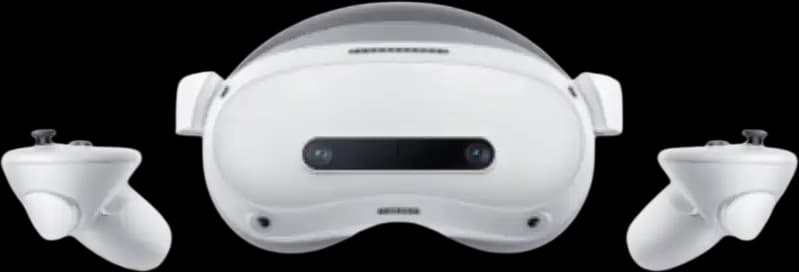
Put an operator at the centre of your G2 trial. Explore VR control, taught movements and data collection with HRS for UK robotics teams and industrial development projects.
PLATFORM FIT
A VR control setup for AGIBOT G2, using Genie Link for operator-led movement, motion teaching and supervised data collection.
Choose direct observation or video feedback around the workspace. Plan the headset, robot connection and network as one system.
Use absolute or relative control to guide the task. Establish a comfortable operator position and suitable limits before handling objects.
Assess the motion or collected demonstration against agreed criteria. Teleoperation keeps a person in control; it does not establish autonomous task performance.
Looking for the robot itself? See the AGIBOT G2 industrial platform for body specifications and candidate factory tasks.
CANDIDATE APPLICATIONS
Four starting points for a scoped, supervised project — not promises of production readiness.
Develop a defined movement sequence with an operator in control. Review approach paths, clearance and repeatability before planning replay.
Explore how G2 approaches and handles your sample objects. Assess reach and end-effector behaviour before setting wider project goals.
Scope a repeatable collection task for a robotics team. Agree the recording workflow, acceptance criteria, storage and access permissions.
Practise control modes and handovers in a managed workspace. Build familiarity with the equipment and stopping procedures before task trials.
SYSTEM SPECIFICATIONS
Manufacturer-documented configuration and network guidance. Performance depends on the software release, network conditions and task. Specify the headset, controllers, cabling and software scope for the proposed G2 setup.
Source: AGIBOT’s English G2 User Manual, sections 7, 12 and 13.
OPERATOR CONTROL
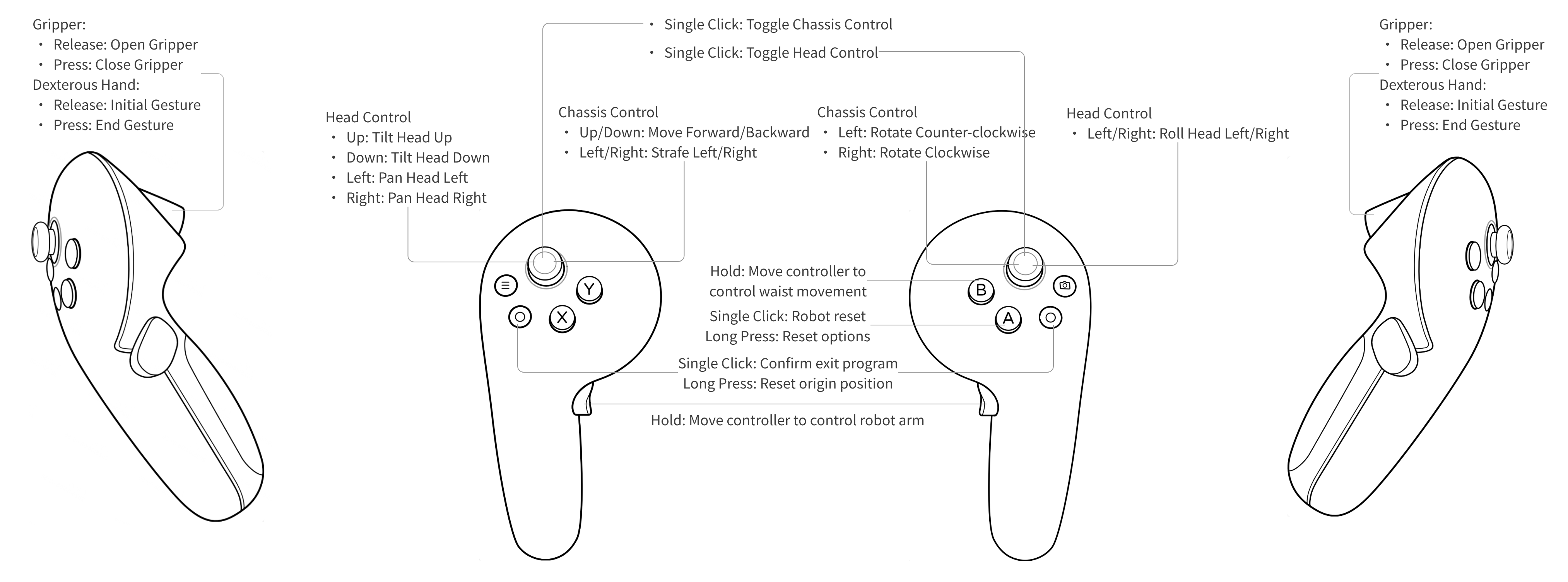
The controller pose maps to the robot end effector. Use a planned starting pose and validate the movement within the robot’s reach and workspace limits.
Incremental commands and a clutch let the operator reposition the controller between movements. This manages operator space; it does not extend the robot’s physical reach.
CONNECTION MODES
Start with where the operator will stand and what they need to see. Local control and video feedback have different setup requirements.
| At a glance | Direct observation | Video feedback |
|---|---|---|
| Operator view | Observe the robot directly | View the robot camera feed in the headset |
| Connection | UDP · direct cable or LAN | WebRTC · LAN or public network |
| Video bandwidth | No returned video stream | 20 Mb/s per robot · recommended for video |
| Local video server | Not used for this mode | Separate purchase · required for LAN video |
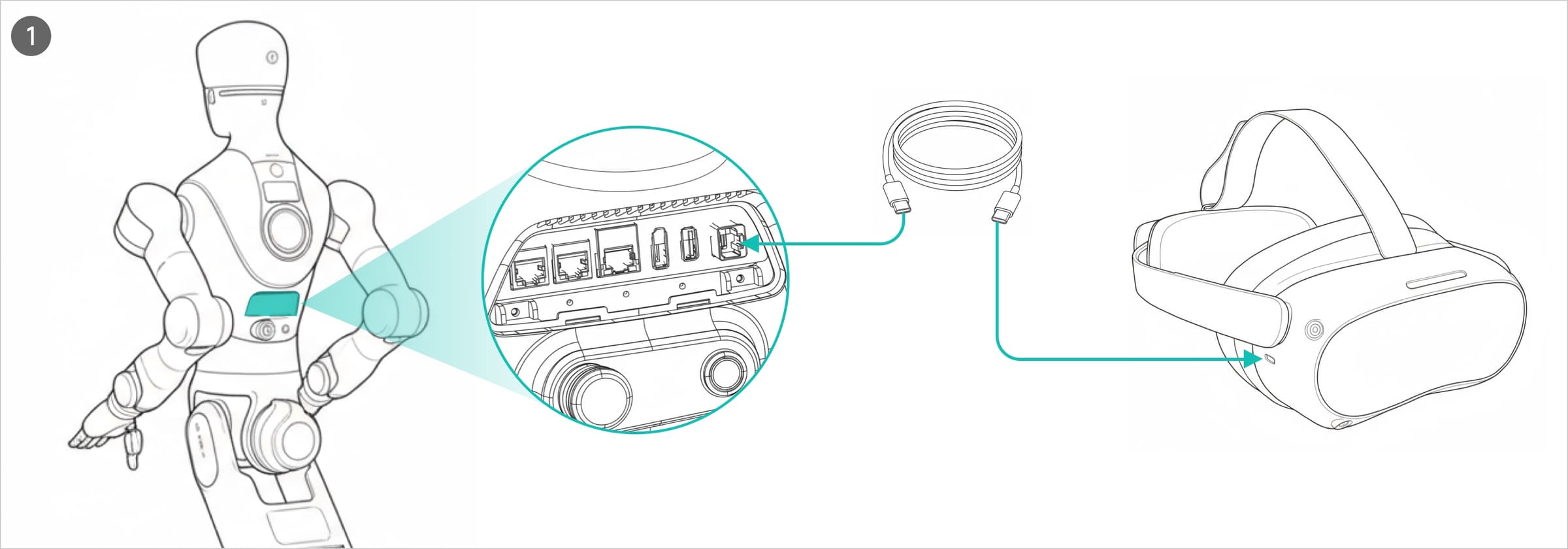
Without a returned video stream, the operator watches G2 directly. The manufacturer’s direct connection uses a USB cable as an Ethernet link; local-network control is another documented option.
With video, the headset displays the robot camera feed. LAN video requires a separately purchased WebRTC server. For LAN or public-network operation, review bandwidth, signal coverage, data access and stopping arrangements at the robot site.
RECORDING & DATA
Plan what you want to keep from a trial: a movement to replay or a structured set of demonstrations.
G2 documents a VR recording workflow. Review saved sequences before replay and retain the recording’s end-effector configuration. Changes to objects, fixtures or the environment need a fresh assessment.
Offline collection uses the robot’s HMI and external storage export. Online collection uses Genie Data, purchased separately. Define the task, data quality criteria and storage requirements before collection begins.
Keep people outside the operating range during replay, avoid rapid or abrupt reversing movements, and follow the manufacturer’s safety instructions. Complete a site-specific risk assessment with trained operators, clear separation and accessible stopping controls. This overview is not an operating procedure.
HRS SUPPORT
HRS can help scope the equipment, environment and operator workflow for your G2 project.
Review sample objects, robot configuration and end effectors. Agree a clear demonstration objective and proposed equipment list.
Choose the connection mode, review site constraints and plan data handling. Identify any server or additional software requirements.
Prepare supervised operator practice and stopping procedures. Record the trial conditions and assess the next step against agreed criteria.
G2 Teleoperation Kit FAQ
It is a VR control setup for the AGIBOT G2 robot. An operator uses a headset, hand controllers and the Genie Link app to command movement. The robot, end effectors, headset configuration, software and network equipment are scoped separately in the proposal; this is not a standalone robot.
Absolute mode maps the controller pose to the robot end effector. Relative mode uses movement increments and a clutch, allowing the operator to reposition the controller between movements. Both remain subject to the robot’s physical limits and the configured workspace.
Not in every mode. AGIBOT documents direct cable and local-network control without returned video, as well as video feedback over a LAN or public network. LAN video requires a separately purchased WebRTC server. AGIBOT recommends 20 Mb/s per robot for video mode; assess signal quality and latency at the intended site.
Yes. The G2 manual documents VR motion recording and replay. Review each sequence in a clear workspace, and use the same end-effector configuration for replay as for recording. A recorded sequence is not evidence that the robot can adapt autonomously to a changed task.
Genie Data for online collection is a separate purchase. The G2 manual also documents offline collection through the robot’s HMI and export to external storage. Agree the collection workflow, software scope, storage and access arrangements before ordering.
This page covers the documented G2 workflow. Do not assume that headsets, apps or accessories transfer between AGIBOT platforms. Ask HRS to check the robot model, software release and intended control setup before selecting equipment.
Send HRS your task, G2 configuration and site requirements. We can discuss a supervised UK demonstration, network planning and operator training. The review should cover workspace separation, stopping arrangements and how the trial will be assessed.
YOUR NEXT STEP
Tell us about your task, G2 configuration and site. We can discuss a supervised UK demonstration and the control setup it needs.