X2 JOINT KIT · COMPONENT ENQUIRIES

X2 Joint Kit.
Start with the right module.

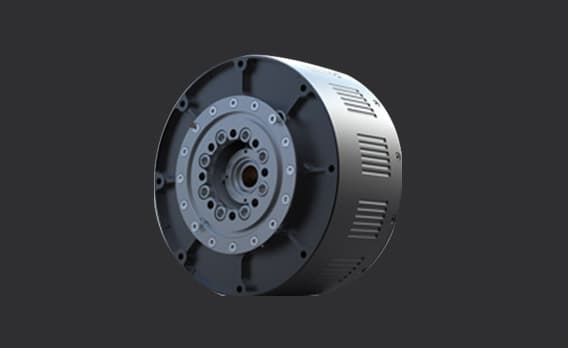
Joint-module illustration

AGIBOT PowerFlow rotary joint-module illustration, shown as a component example rather than X2 Joint Kit contents
AGIBOT PowerFlow from the manufacturer’s RAISE A1 overview. A joint-module example, not an illustration of the X2 Joint Kit contents. Manufacturer image source.

Discuss joint-module requirements for your X2 project with HRS. Start with your robot revision and intended task, then review the mechanical, electrical and control requirements as one setup.

COMPONENT BASICS

The hardware behind a joint’s movement.

An actuator provides the force or torque that moves a robot joint. An integrated rotary module can bring the motor, transmission, position sensing and drive electronics into one assembly.

Motion

The motor supplies movement. Where a reduction stage is used, it changes the relationship between motor speed and output torque.

Feedback

Position sensing allows the control system to track the joint. The sensing arrangement and calibration belong to the specific hardware design.

Control

Drive electronics regulate the motor. A working setup also needs compatible power, communication and control software.

These are general component principles. AGIBOT’s X1 component overview gives examples of integrated PowerFlow drives; their model-specific ratings are not X2 Joint Kit specifications.

SELECTION CHECKLIST

Specify the connection, not just the component.

Whether you are asking about a replacement joint or planning a development rig, define the hardware and test requirements before choosing a module.

  1. 01

    Identify the hardware

    Start with the robot variant, hardware revision, joint location and module part number. Include clear photographs of the nameplate and connectors where available.

  2. 02

    Check the mechanical fit

    Review mounting dimensions, output connection, travel limits and the intended load. A similar-looking housing does not establish that two modules are interchangeable.

  3. 03

    Plan power and control

    Specify the supply, cabling, controller, communication interface and software requirements together. Agree which items belong in the proposed component list.

  4. 04

    Define a safe evaluation

    Set an objective for the first test, with suitable mounting, guarding and stopping arrangements. Follow the exact hardware’s manufacturer instructions before energising a joint.

DEVELOPMENT CONTEXT

A robot interface is not a component list.

Joint commands describe how a supported robot is controlled. They do not establish which actuator, controller, cables or software are supplied in a separate kit.

AGIBOT’s X2 documentation identifies joints by their location and movement axis, and documents control interfaces for supported robot versions. Use the documentation that matches your hardware; do not assume a whole-robot interface is a standalone actuator SDK.

Looking for a complete robot?

The complete platforms have their own product guides. Explore AGIBOT X2 for interaction and demonstrations or X2 Ultra for perception and robotics development.

HRS SUPPORT

Bring us the task and the hardware details.

For a UK joint-module enquiry, tell us what you have, what you want to achieve and where the work will take place. We can review the requirements and discuss the next step.

For replacement-part enquiries, identify the existing module and robot revision. For research or teaching, describe the proposed rig, control environment and evaluation objective. Agree the component list and support scope before an order.

X2 Joint Kit FAQ

Questions, answered.

What is a robot joint module?

A joint module is an actuator assembly that drives movement at a robot joint. Integrated rotary designs can combine a motor, transmission, position sensing and drive electronics. The pictured AGIBOT PowerFlow is a component example, not a packing list for the X2 Joint Kit.

What should I send with an X2 Joint Kit enquiry?

Send the exact X2 variant and hardware revision, the joint or module part number where available, and your intended task. For an existing robot, clear nameplate and connector photographs help identify the required hardware. HRS can review the enquiry and discuss the next step.

Are X2, X2 Ultra and X2 EDU joint modules interchangeable?

Do not assume interchangeability from the X2 family name. Match the module part number, mechanical mounting, electrical connections, controller and firmware requirements to the specific robot revision before selecting a replacement or development component.

Which torque and speed figures should I use?

Use the manufacturer’s datasheet for the exact actuator, including its rated and peak limits and their operating conditions. Whole-robot performance figures and the ratings of other PowerFlow models are not specifications for an X2 joint kit.

Does robot joint-control software define what comes in a kit?

No. A robot control interface describes supported commands and feedback, not a supplied component list. Specify the modules, controller, power equipment, cables and software scope separately, and check that the documentation applies to the proposed hardware.

Can I discuss a UK joint-module project with HRS?

Yes. Contact HRS with your robot or development setup, intended use and location. We can review the component requirements and discuss configuration and support before an order is agreed.

YOUR NEXT STEP

Which joint does your project need?

Share the robot revision, module details and intended use. Let’s discuss the component requirements for your project.